

81% OFF
Divi Black Friday Deal: Up to 81% Off
Black Friday 2026: Divi Pro 80% off, Lifetime + Pro 81% off, or Divi from $67/year. Ends November 30.
The Elegant Themes Black Friday 2026 sale is live and takes up to 81% off Divi until November 30, 2026 at 6 PM Pacific time. Here is the short version:
- Divi Lifetime + Pro: $197 once, then $130 a year for Pro services (81% off)
- Divi Pro: $176 a year (80% off)
- Divi Lifetime: $187 once (25% off)
- Divi Yearly: $67 a year (25% off)
You don’t need a code. The discount is applied automatically when you open Elegant Themes through our link. Every plan includes unlimited website usage and Elegant Themes’ money back guarantee.
Below you will find what each plan really includes, which one we recommend, and how to install and activate Divi after you buy.
Elegant Themes Pricing in 2026 (Black Friday Prices)
Elegant Themes now sells Divi in two ways: as a yearly subscription or as a one time lifetime purchase. Each comes as standalone Divi or as Divi Pro, which bundles extra services.
| Plan | Black Friday price | Regular value | Saving |
|---|---|---|---|
| Divi Lifetime + Pro | $197 once, then $130/year | $1,048 | $851 (81%) |
| Divi Pro | $176/year | $888 | $712 (80%) |
| Divi Lifetime | $187 once | $249 | $62 (25%) |
| Divi Yearly | $67/year | $89 | $22 (25%) |
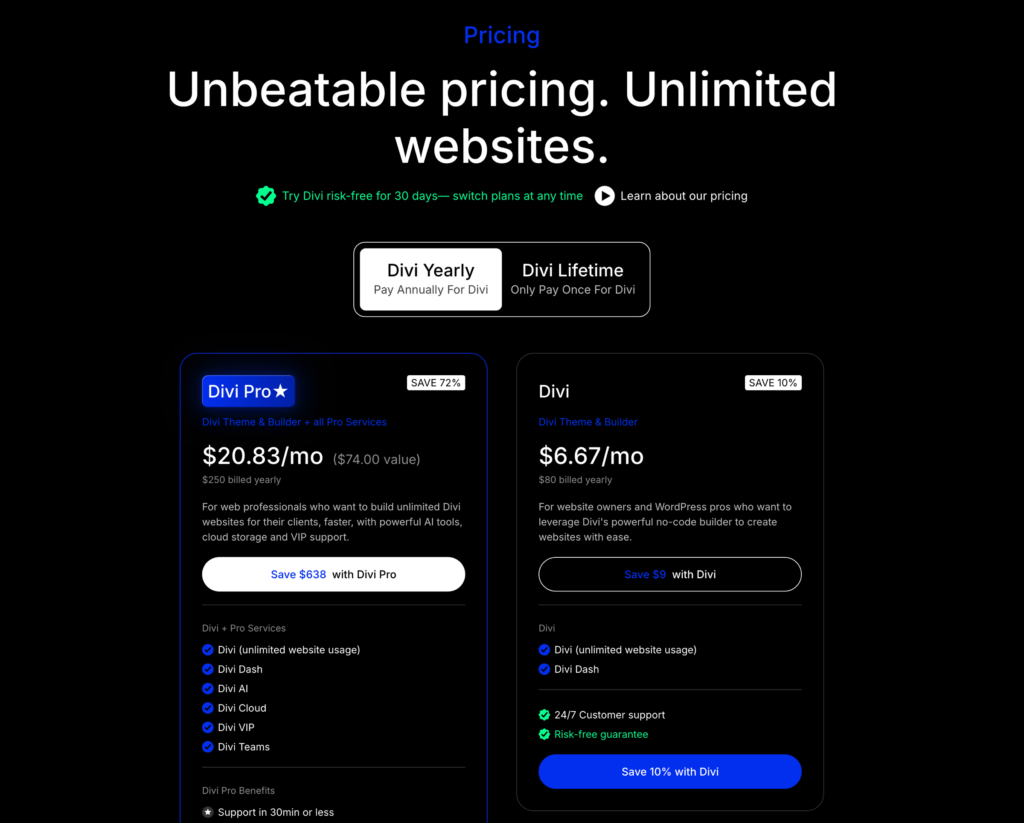
Switch the toggle to Lifetime on the pricing page to see the lifetime deals:
How Much Does Divi Cost?
Without a discount, Divi costs $89 a year or $249 for lifetime access. During the Black Friday sale it costs $67 a year or $187 lifetime. That price covers the Divi theme, the visual builder and Divi Dash on unlimited websites.
What Is in Divi Pro?
Divi Pro adds five services on top of Divi: Divi AI (unlimited AI layouts, text, images and code), Divi Cloud (unlimited cloud storage), Divi VIP (support in 30 minutes or less, 10% off Marketplace), Divi Teams (four team member seats) and Divi Dash. Bought separately they come to about $888 a year, which is where the 80% Black Friday saving comes from.
New Divi Pro members also get a $50 Marketplace credit and the Don Divi Collection ($170 value).
What Does “Lifetime” Cover?
Only Divi and Divi Dash are lifetime. The Pro services (AI, Cloud, VIP, Teams) are always yearly, which is why Lifetime + Pro has a $130 yearly fee. You can cancel those services any time and keep using Divi forever.
Elegant Themes Black Friday 2026
The Divi Black Friday 2026 sale is live now. It started on November 24 and ends on November 30, 2026 at 6 PM Pacific time. Black Friday is the one time each year Elegant Themes offers its biggest Divi discounts, which is why the prices above are lower than its usual offer.
Extra Black Friday perks: every qualifying purchase comes with a free Divi Marketplace product while supplies last, plus an exclusive Divi 5 design system. Divi AI is 70% off, Divi Cloud, VIP and Teams are 44% off, and the Divi Marketplace bundles are 70% off. If you plan to use Divi in the next year, buy before November 30, because the prices go up again after the sale.
Is There an Elegant Themes Coupon Code?
No. Elegant Themes doesn’t use coupon codes, and there is no code box at checkout. Any “Elegant Themes coupon code” or “Divi discount code” you find elsewhere is either fake or a leftover from an old Black Friday sale.
The real discount is a link based offer. Open Elegant Themes through our button and the reduced prices show up on the pricing page automatically.
How to Get the Elegant Themes Discount (Step by Step)
Step 1: Open the offer. Click this Elegant Themes discount link. You land on the pricing page with the discounted prices already showing.
Step 2: Pick yearly or lifetime. Use the toggle at the top. Divi Yearly shows $67 and $176 (Pro). Divi Lifetime shows $187 and $197 (Lifetime + Pro).
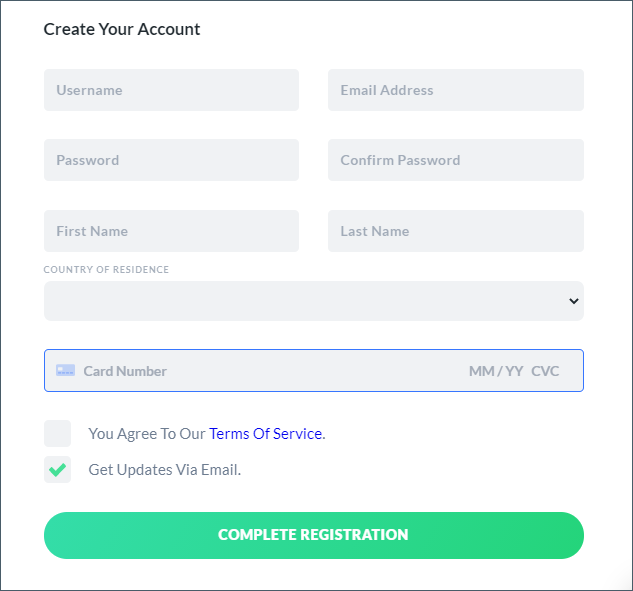
Step 3: Create your account. Enter your name, email, username and password, then click the button to complete registration.
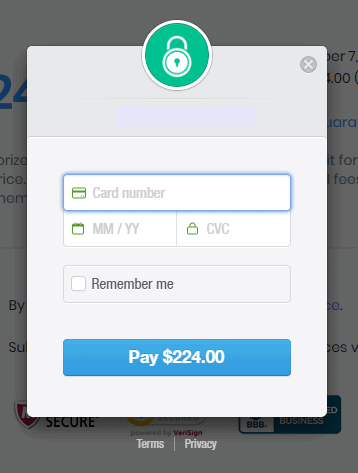
Step 4: Pay. Enter your card or PayPal details and confirm the payment.
Step 5: Check your email. You get a confirmation email, and you can log in to your Elegant Themes account right away.
How to Install and Activate Divi on WordPress
Once you have bought Divi, here is how to get it running on your site.
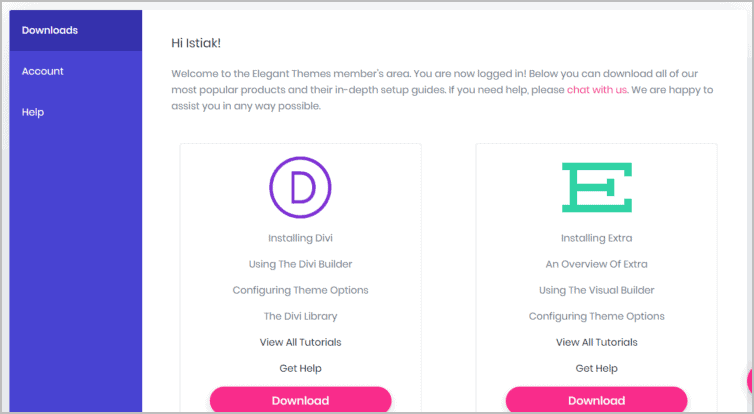
Step 1: Download Divi. Log in to your Elegant Themes account and download the Divi theme (a .zip file).
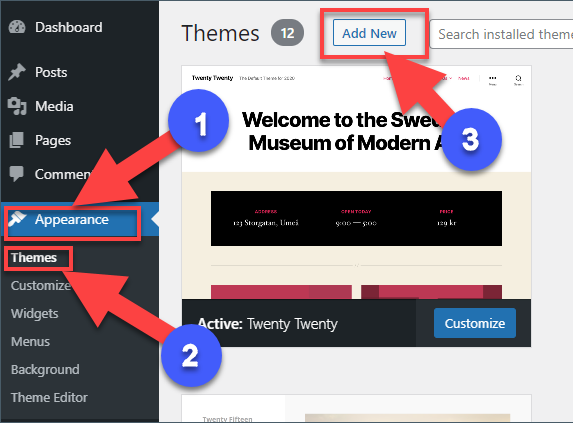
Step 2: Upload it to WordPress. In your dashboard go to Appearance > Themes > Add New Theme > Upload Theme. Need more help? See our guide on how to install a WordPress theme.
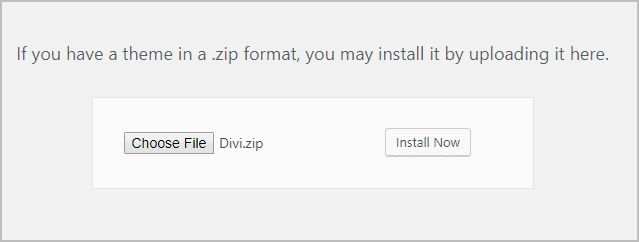
Step 3: Install and activate. Choose the .zip file, click Install Now, then click Activate once the install finishes.
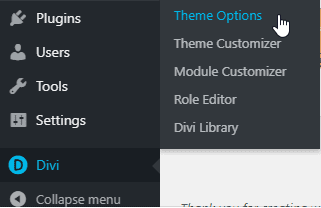
Step 4: Open the Divi update settings. Go to Divi > Theme Options, then switch to the Updates tab.
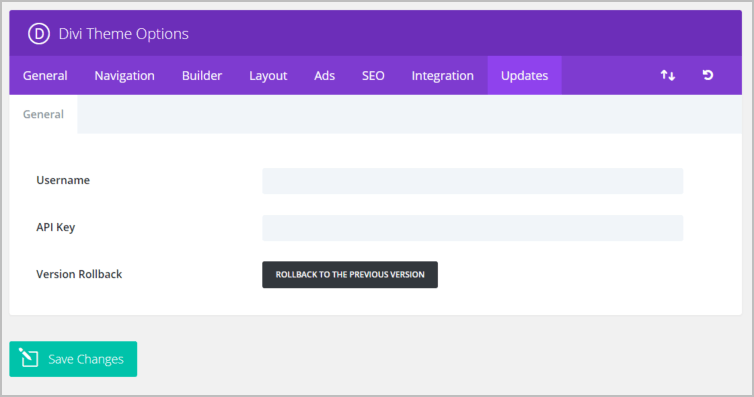
Step 5: Add your API key. In your Elegant Themes account, open Account > API Key and copy the key. Paste it into the Updates tab along with your username, then save. This turns on automatic updates.
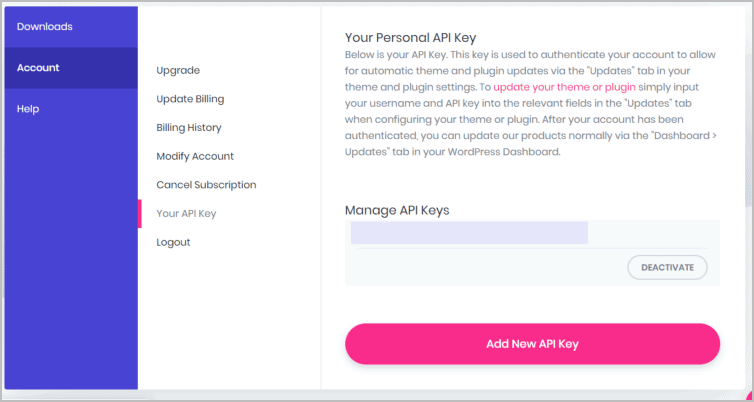
That’s it. Divi is installed, activated and will keep itself updated.
Which Elegant Themes Plan Should You Choose?
| If you are… | Choose | Why |
|---|---|---|
| A freelancer or agency building client sites | Divi Pro ($176/year) | AI, cloud storage, team seats and 30 minute support for about a fifth of the separate price |
| Sure you will use Divi for years and want Pro tools | Divi Lifetime + Pro ($197 + $130/year) | The builder is paid off today, only the services renew |
| Happy with just the builder | Divi Lifetime ($187) | Pays for itself in about three years compared with yearly |
| Trying Divi for the first time | Divi Yearly ($67) | Lowest upfront cost, and you can upgrade later |
Our pick for most readers is Divi Lifetime if you only need the builder, and Divi Pro if you build websites for a living.
Divi or the WordPress Block Editor?
Divi is a complete design system with its own visual builder. It suits people who want full control over every page and are happy to work inside Divi.
If you would rather stay with the free WordPress block editor (Gutenberg), you can get many of the same building blocks without a page builder. Plugins like Ultimate Blocks add tabs, accordions, call to actions, testimonials, review boxes and more, and your content stays portable if you ever change themes.
Neither choice is wrong. If you are comparing options, our list of the best WordPress page builders covers Divi alongside its main rivals.
FAQs
What is Elegant Themes?
Elegant Themes is the company behind Divi, one of the most popular WordPress themes and visual page builders. It also makes the Extra theme and the Bloom and Monarch plugins.
How much does Elegant Themes cost?
Divi costs $89 a year or $249 lifetime at regular price, and $67 a year or $187 lifetime during the Black Friday 2026 sale (until November 30). Divi Pro costs $176 a year, and Lifetime + Pro costs $197 plus $130 a year.
Does the Divi discount work for existing customers?
Yes, partly. During Black Friday, existing members can upgrade to Divi Lifetime at 25% off, renew at 25% off, or repackage their current services into a discounted bundle. Log in to your account to see the offers available to you.
Can I use Divi on unlimited websites?
Yes. Every plan, yearly or lifetime, allows unlimited websites, including client sites.
Is there a Divi Black Friday sale?
Yes. The Divi Black Friday 2026 sale is live now and ends on November 30, 2026 at 6 PM Pacific time. See the Black Friday section above for the full details.
What is Divi 5?
Divi 5 is the rebuilt, faster version of the Divi builder. It is included at no extra cost on every plan.
Is Elegant Themes worth it?
For anyone building several sites, yes. The unlimited site licence is cheaper than most per site page builders, and the lifetime option means you can stop paying for the builder entirely.
Can I get a refund?
Yes. Elegant Themes offers a risk free money back guarantee, so you can try Divi and ask for a refund if it doesn’t suit you.
Final Words
If you have been waiting for a good moment to buy Divi, the Black Friday sale is it: 81% off Lifetime + Pro, 80% off Divi Pro, or Divi alone from $67 a year, until November 30, 2026. No code, no catch, and the money back guarantee covers you if it is not the right fit.
Have a question about the plans or the install? Ask in the comments and we will help.
Disclosure: This post contains affiliate links. If you buy through them, we may earn a small commission at no extra cost to you. Thanks for your support.
Found this helpful? See more of us on Google.
Add UltimateBlocks.com as a preferred source and our WordPress guides will show up more often in your Top Stories, AI Overviews and AI Mode.
Free, one tap, remove anytime


Leave a Reply