

Author: Istiak Rayhan
-
How To Import Articles From Google Docs To WordPress
·
Love writing content on Google Docs? We all do! But when it comes to importing content from Google Docs to WordPress, things start to get messy. It’s because directly copying content from Google Docs to WordPress editor isn’t the way to go always. Do you wish there was a solution that would let you import
-
10 Proven Tips To Improve Organic Click-Through Rate (CTR)

Ranking your site on top of Google is the first part of a long race to convert users into leads and customers. If your site ranks on top of your desired keyword, it doesn’t necessarily mean it’ll get all the traffic from that search query. Many SEOs often overlook the organic CTR (Click-Through Rate) and
-
How to Wrap Text Around Image in WordPress
·

Do you want to learn how to wrap text around an image in WordPress? In this article, I’ll walk you through the entire process of aligning images right next to text in WordPress. Since Gutenberg, the method of wrapping text around images has changed. So, this tutorial will help you a lot if you’re new
-
How To Remove A Block In WordPress Block Editor

No Doubt, Block Editor really makes it easy to manipulate blocks that you add to your posts/pages. With this block based editor, it’s super easy to add content in a more effective way. ` But what if you want to delete a block? It’s extremely easy. Here I’ll walk you through how to remove a block
-
How To Create, Manage, & Edit Reusable Blocks In WordPress

The new WordPress block editor (Gutenberg) introduced an awesome feature called Reusable Blocks. With reusable blocks, you can save a content block and use them on other pages on your website. In this article, I’ll show you how to create reusable blocks in the Block editor. We’ll also take a look at how you can
-
How To Check Word Count In WordPress Post/Page
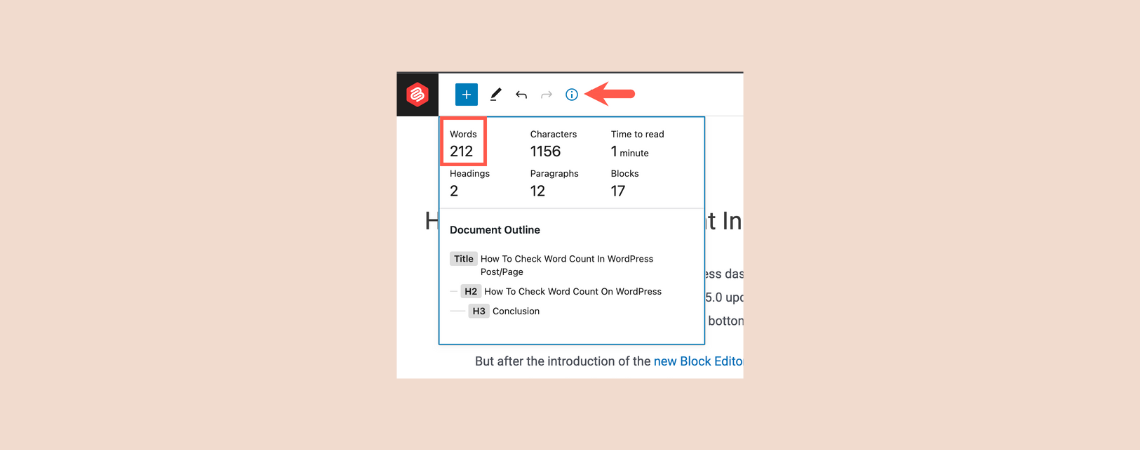
While creating a new post on the WordPress dashboard, we need to check the total word count sometimes. Before the WordPress 5.0 update, it was very easy to check the word count for any post/page. It used to show on the bottom of the classic editor. But after the introduction of the new Block Editor
-
How to Redirect URLs in WordPress (2 Simple Ways)
·

Looking to learn how to redirect URLs in WordPress? You’ve come to the right place! In this article, I’ll be walking you through the steps of redirecting URLs in WordPress in a simple manner. I’ll cover two different ways you can use to redirect URLs. But before we get into that, let’s first learn what
-
How To Edit & Change Post/Page URL In WordPress

After the WordPress 5.0 update, WordPress has introduced a new content editor called Gutenberg aka Block Editor. The new editor has completely replaced the old classic editor. As a result, a lot of things have changed. Though the new editor is more advanced, it might take some time to get used to it and understand
-
5 Best Free Trial ‘Cloud Hosting’ Services (No Credit Card)

Finding a new cloud hosting service for your website can be confusing and overwhelming. With so many web hosting providers out there, it becomes difficult to compare and pick the one perfect for your needs. But if you still somehow manage to do it, it can go south quickly when you realize that the hosting
Search
Recent Posts
- How to Add & Embed Videos in WordPress (3 Easy Ways)
- 15+ Best WordPress Lifetime Deals (Plugins, Themes, & More)
- Tabbed Content (Tabs) Block Use Cases for WordPress (With Examples)
- Content Toggle (Accordion) Block Use Cases for WordPress (With Examples)
- 10+ Best WordPress Plugins for Writers and Authors
Categories
- Affiliate Marketing (5)
- Alternatives (2)
- Blogging (20)
- Books (8)
- Comparison (1)
- Courses (1)
- Deals (41)
- Giveaway (1)
- Gutenberg (47)
- How To (416)
- Marketing (2)
- Payment (1)
- Productivity (2)
- Release Notes (1)
- Review (7)
- SEO (5)
- Services (1)
- Sites (1)
- Themes (69)
- Tools (8)
- Web Hosting (11)
- WooCommerce (6)
- WordCamp (1)
- WordPress Block Editor Tutorials (101)
- WordPress Fixes (4)
- WordPress Hosting (19)
- WordPress Plugins (119)