

Author: Uzzal Raz Bongshi
-
How to Change YouTube Embed Size in WordPress
·
YouTube videos are a great way to add visual content to your WordPress website. However, the default size of the video may not be ideal for your desired presentation or layout. Luckily, you can easily change YouTube embed size in WordPress. If you don’t know how to do it, then you are in the right
-
How to Add a Background Image in WordPress Easily
·

Are you looking for a way to add a background image to your WordPress website? A carefully selected background image can instantly change the look of your WordPress website, creating a more engaging and immersive environment for your visitors. It’s such a powerful design element that can enhance storytelling, focus on some of your brand’s
-
How to Center a YouTube Video in WordPress
·

Would you like to set your YouTube videos at the center of your WordPress website? By default WordPress automatically align your video to the left, if its width is less than that of your article field. Here, I have shown a quick process that will take only a couple of seconds. Then you will find
-
How to Add Categories and Subcategories in WordPress
·
As a beginner, you might not know, how to add categories and subcategories. Don’t worry, I have got your back here. Categories and subcategories help you to organize your posts. It helps readers to find the correct content they have been looking for. Proper content categorization also helps to improve the SEO ranking of your
-
How to Add a Link to the Cover Block in WordPress
·

A visually engaging content is the key to capture your audience’s attention. The cover block is the just perfect tool for this purpose. By adding a link on the cover block you can turn this eye catching block into a powerful call to action. If you don’t know how to add a link to the
-
How to Add Feature Boxes With Icons in WordPress
·

Feature Boxes with Icons can make your WordPress posts/pages attractive. These boxes allow you to highlight features in an easy-to-understand and engaging way. When it comes to adding feature boxes with icons, you need to have coding skills or you need to use a plugin. Here, I will be sharing how to add feature boxes
-
How to Duplicate Block(s) in WordPress
·

Duplicating blocks in WordPress can simplify your content creation process, allowing you to quickly reuse layouts and designs without starting from scratch. This feature is handy when maintaining consistency across your posts or pages. Whether you’re creating multiple sections with similar formatting or experimenting with different content variations, duplicating blocks saves you time and effort.
-
Where is the Styles Tab in WordPress Block Editor?
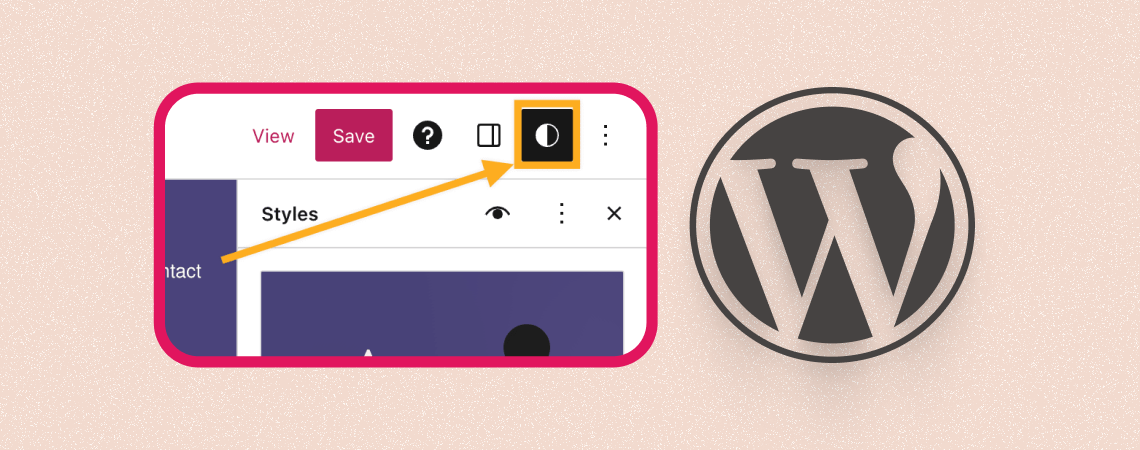
Looking for other block settings? They’ve moved to the styles tab. You might have noticed this notification under the block options panel. So if you’re looking for the ‘Styles Tab’, you’re in the right place. The Styles tab in WordPress is a feature that allows you to customize the appearance of your blocks without having
-
How to Change Button Text in WordPress Block Editor
·

Buttons play a crucial role in guiding users toward actions like signing up or purchasing. The text on these buttons directly impacts conversions. Effective button text improves clicks by aligning with your audience’s expectations. For example, replacing generic “Submit” text with action-oriented phrases like “Get Your Free Guide” often boosts engagement. This guide will show
Search
Recent Posts
- 10 Best FREE Notification Bar WordPress Plugins (Compared)
- Rapyd Cloud Review: Fast, Secure, and Built for WordPress Sites That Can’t Afford to Fail
- How to Create a Multi-Server Video Player in WordPress Using Tabs
- 10 Best User Feedback Plugins for WordPress
- 8 Best Timeline WordPress Plugins (Free & Premium)
Categories
- Affiliate Marketing (5)
- Alternatives (2)
- Blogging (20)
- Books (8)
- Comparison (1)
- Courses (1)
- Deals (41)
- Giveaway (1)
- Gutenberg (47)
- How To (417)
- Marketing (2)
- Payment (1)
- Productivity (2)
- Release Notes (1)
- Review (7)
- SEO (5)
- Services (1)
- Sites (1)
- Themes (69)
- Tools (8)
- Web Hosting (12)
- WooCommerce (6)
- WordCamp (1)
- WordPress Block Editor Tutorials (101)
- WordPress Fixes (4)
- WordPress Hosting (19)
- WordPress Plugins (119)