 Skip to content

WordPress is SEO friendly out of the box, but only up to a point. It will not write your title tags, tell Google about a new post, find your orphan pages, or catch the broken links piling up in your old articles. Plugins do that work for you.
The problem is that most “best SEO plugin” lists throw fifteen tools at you in no particular order. This one is ranked, and here is the logic behind the ranking:
- How directly it affects search performance. A plugin that controls your titles, meta descriptions, and sitemaps matters more than one that adds share buttons.
- How well it is maintained. We checked the last update date, the version number, and the support history of every plugin listed here.
- How many people actually rely on it. Install counts and ratings are not everything, but they tell you whether a plugin is battle tested.
- What you get for free. A tool that solves a real problem without a credit card ranks higher than one that locks the useful part behind a paywall.
You do not need all fourteen. Pick one all in one SEO plugin, add a speed plugin, then fill the gaps that apply to your site.
(All install counts, versions, and prices below were checked in August 2026. Plugin pricing changes often, so click through before you buy.)
Best WordPress SEO Plugins at a Glance
# | Plugin | What it does | Price | Best for |
|---|---|---|---|---|
1 | Rank Math | All in one SEO: titles, meta, schema, sitemaps, redirects | Free, paid Pro available | Most WordPress sites |
2 | Yoast SEO | All in one SEO with strong content and readability analysis | Free, paid Premium available | Beginners and teams |
3 | WP Rocket | Caching and speed optimization | From $59/year | Fixing slow page loads |
4 | CrawlWP SEO | Faster indexing plus Search Console data inside WordPress | Free, Pro from $59/year | Sites that publish often |
5 | Link Whisper | Automatic internal linking suggestions | Free Lite, Pro from $97/year | Sites with 100+ posts |
6 | Smush | Image compression and lazy loading | Free, Pro via membership | Image heavy sites |
7 | Redirection | 301 redirects and 404 tracking | Free | Site migrations and URL changes |
8 | Broken Link Checker | Finds and fixes dead links | Free | Older sites with many outbound links |
9 | Schema Pro | Dedicated structured data across your whole site | $79/year or $249 once | Sites needing schema at scale |
10 | Ultimate Blocks | Content blocks that improve readability and engagement | Free, paid Pro available | Bloggers using the block editor |
11 | WP Last Modified Info | Shows and marks up “last updated” dates | Free | Sites that regularly refresh old posts |
12 | Semrush SEO Writing Assistant | Content scoring against top ranking pages | Free plugin, needs a Semrush account | Existing Semrush subscribers |
13 | ThirstyAffiliates | Affiliate link cloaking and management | Free, Pro from $99.60/year | Affiliate sites |
14 | Social Snap | Social share buttons and click to tweet | Free Lite, paid Pro | Sites focused on social traffic |
1. Rank Math
Free • 4 million+ active installs • 4.8 stars
Rank Math is one of the two most widely used SEO plugins for WordPress, and it is the one we recommend to most people. It came from the team behind MyThemeShop and has grown into a full SEO suite that handles nearly everything on this list’s first few jobs at once.
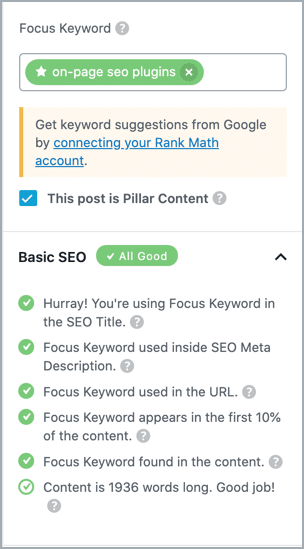
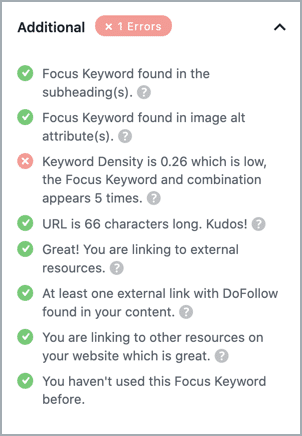
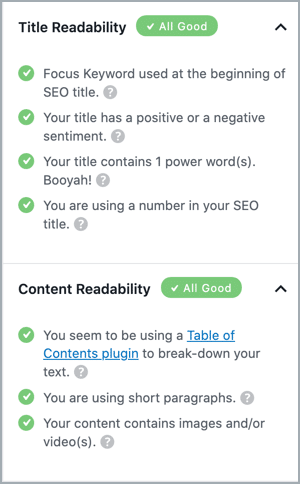
When you write a post, Rank Math scores it against a set of on page checks: is your focus keyword in the title, the URL, the first paragraph, the subheadings, the image alt text, and so on. It is a checklist, not a magic ranking button, but it stops you forgetting the basics.
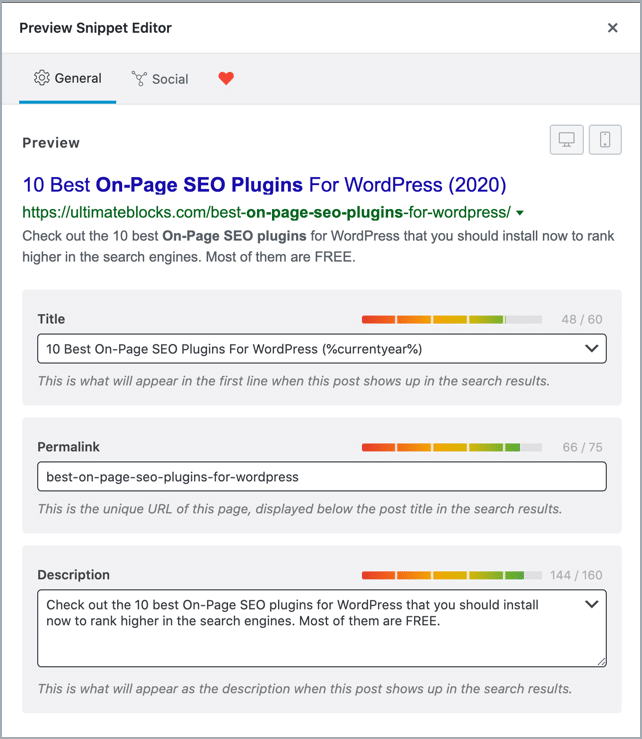
You also get full control over your page titles and meta descriptions, plus a preview of how the result will look in Google. This is where you can genuinely improve your click through rate.
Beyond content analysis, the free version includes XML sitemaps, schema markup for more than 20 content types, a redirect manager, a 404 monitor, role based access control (useful if you have writers), and one click importing from other SEO plugins. Most competitors charge for at least half of that.
Rank Math has also added a set of AI writing tools inside the editor for generating titles, meta descriptions, and outlines. These run on a monthly credit allowance, with paid Content AI plans if you want more.
Price: Free. Paid Pro plans add keyword tracking, deeper analytics, and more AI credits.
Downside: The sheer number of settings can be intimidating on day one. Work through the setup wizard and ignore the advanced modules until you need them.
Related: Best Yoast SEO alternatives
2. Yoast SEO
Free • 13 million+ active installs
Yoast is the most installed SEO plugin in the WordPress world, and it has been around since 2008. If Rank Math feels like too much, Yoast is the calmer option.
The two plugins cover the same ground: titles, meta descriptions, sitemaps, canonical tags, social previews, and schema. Where Yoast is stronger is guidance. Its content and readability analysis explains why something is a problem in plain English, and its documentation is the best in the category. That matters a lot if you have writers who are not SEO people.
Where it is weaker is the free tier. Yoast keeps more behind its Premium version than Rank Math does, most notably the redirect manager and multiple keyword targeting.
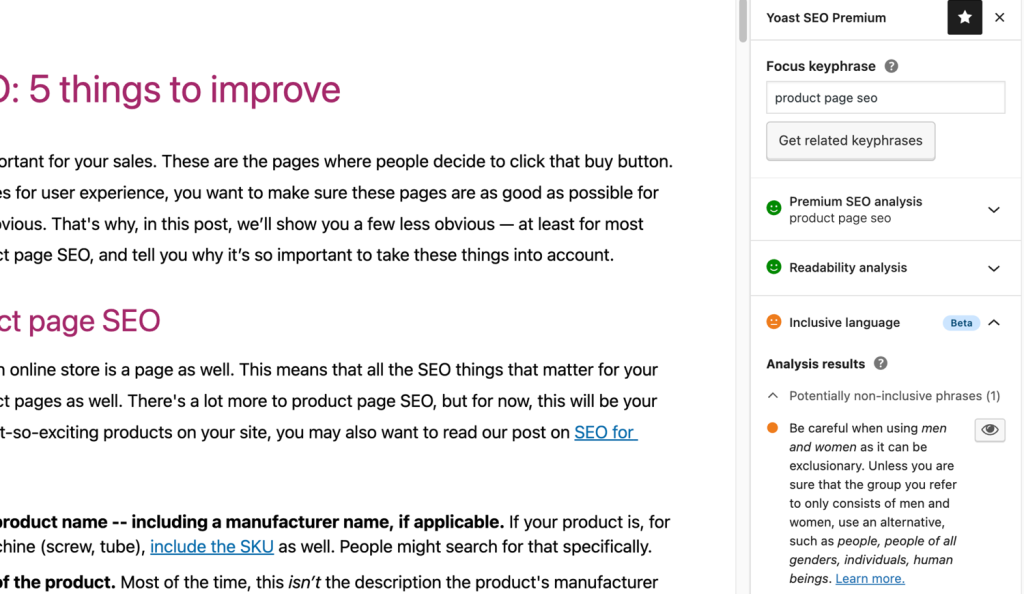
Price: Free, with a paid Premium version.
Pick Yoast if you want the safest, best documented option. Pick Rank Math if you want the most features without paying. Do not run both at the same time.
3. WP Rocket
From $59/year • No free version
Page speed is one of the few things on this list that Google has openly confirmed it uses as a ranking signal, through Core Web Vitals. A slow site also loses visitors before they read a word.
WP Rocket is the easiest way to fix that on WordPress. Unlike most caching plugins, it applies sensible settings the moment you activate it. You do not have to understand what “minification” means to benefit from it.
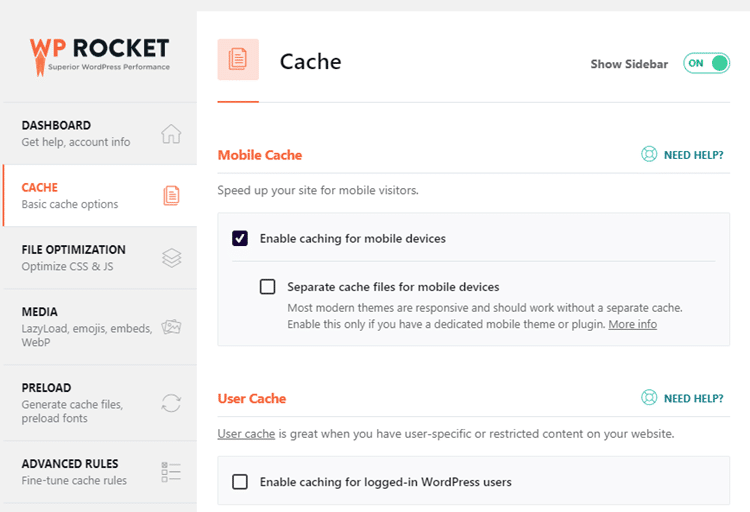
What it does:
- Page caching (saves a ready made copy of your pages so the server does less work)
- Preloading (warms the cache so the first visitor gets a fast page too)
- Minification of CSS and JavaScript files
- Removing unused CSS and delaying JavaScript, which is the feature free plugins struggle to match
- Lazy loading for images, iframes, and videos
- Database cleanup
- GZIP compression and CDN support
Price: $59/year for one site, $119/year for three sites, $299/year for up to 50 sites. All plans include every feature, the only difference is the number of sites. There is a 14 day money back guarantee.
Worth knowing: If your host runs LiteSpeed (Hostinger and A2 Hosting, among others), the free LiteSpeed Cache plugin is a genuine alternative. WP Rocket’s advantage is that it works well everywhere.
4. CrawlWP SEO
Free • 40,000+ active installs • 4.7 stars
Here is a problem no other plugin on this list solves: you hit publish, and then nothing happens. Google has to find your new post before it can rank, and left alone that can take days or weeks.
CrawlWP tells search engines about your content the moment you publish, update, or delete it. It does this two ways. For Bing, Yandex, Naver, Seznam.cz, and Yep it uses the IndexNow protocol, which is a simple, safe ping that those engines share with each other. For Google, which does not support IndexNow, it connects to the Google Indexing API directly.
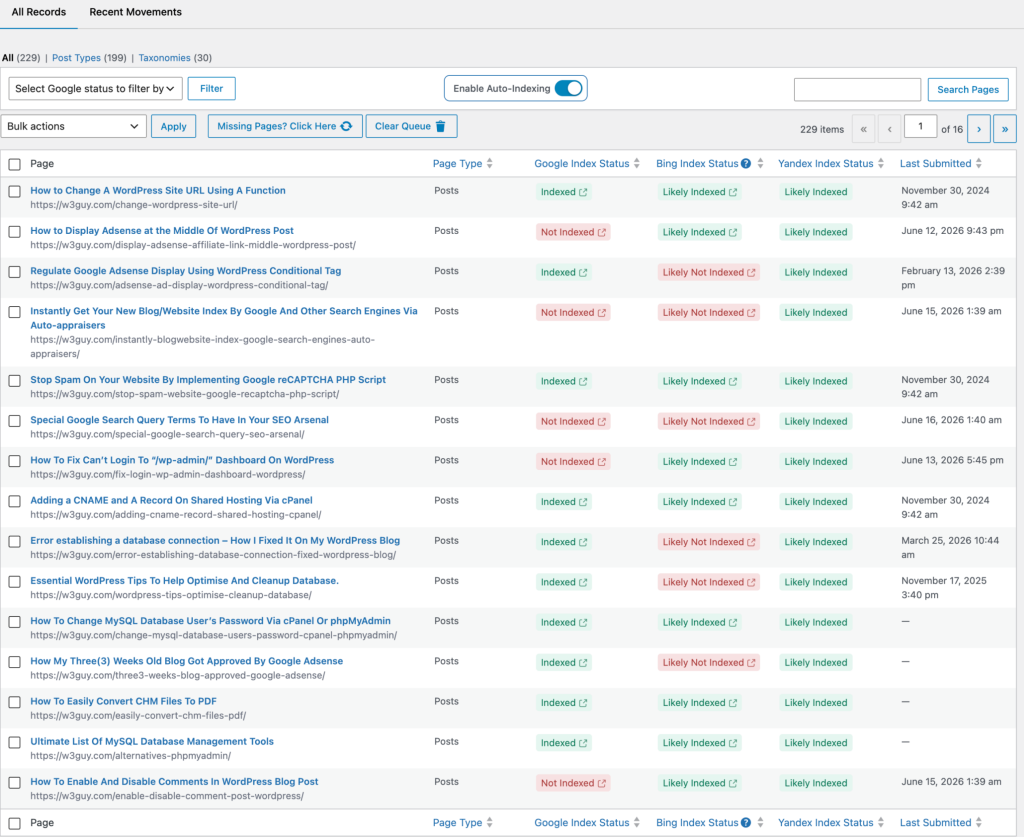
The paid version is where CrawlWP becomes an SEO reporting tool rather than just an indexing tool. It connects to Google Search Console, Bing Webmaster Tools, and Yandex Webmaster and pulls the data into your WordPress dashboard: clicks, impressions, click through rate, average position, the keywords you rank for, and your best performing pages. No more switching between tabs to answer a simple question.
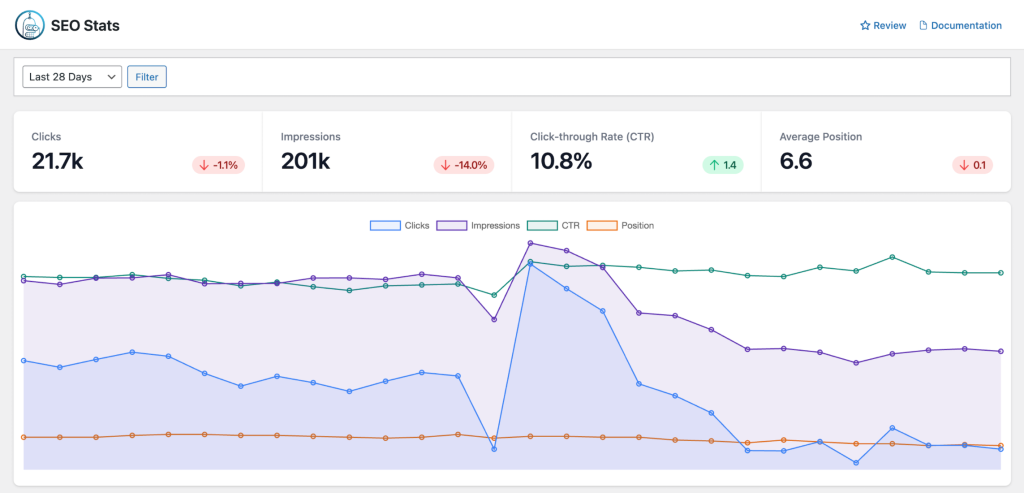
You also get an index status checker that shows which of your posts and pages are actually indexed, bulk submission for pushing many URLs at once, auto indexing that finds unindexed content and submits it for you, indexing history, and scheduled email reports covering your search performance and anything that has been indexed or de-indexed.
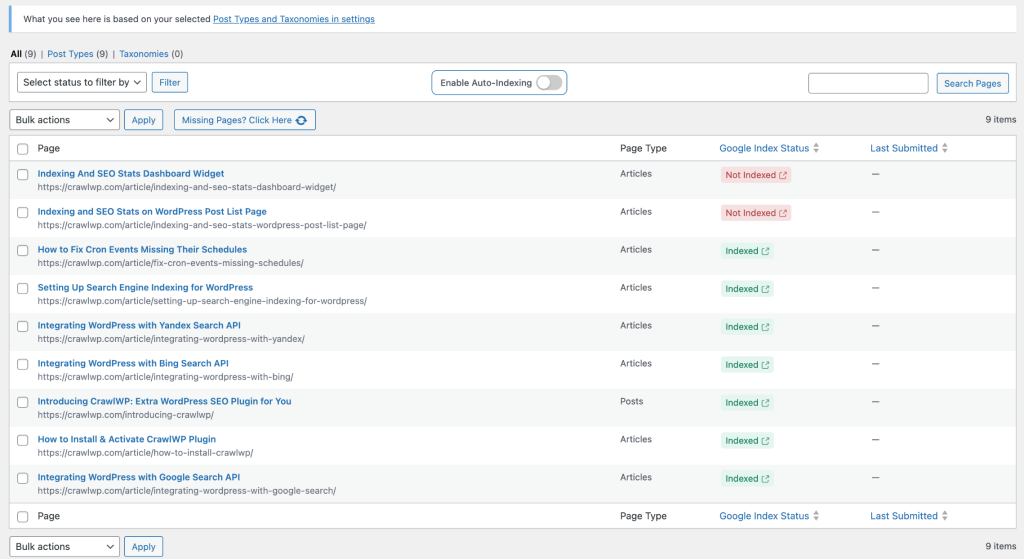
What is free and what is not: The free version on WordPress.org handles the instant indexing itself, including IndexNow and the Google, Bing, and Yandex APIs. The Search Console dashboard, index status checker, bulk submission, indexing history, and email reports are all Pro features.
Price: Free on WordPress.org. Pro is $59/year for one site, $159/year for five sites, and $259/year for unlimited sites. Lifetime licenses are $359, $559, and $759 respectively. There is a 14 day money back guarantee.
Honest note: Faster indexing does not directly raise your rankings. It shortens the wait before your content can start competing at all, which matters most if you publish regularly or cover time sensitive topics. Also, Google designed its Indexing API primarily for job postings and live streams, so use it selectively rather than firing hundreds of URLs at it. The IndexNow side has no such caveat.
It pairs with, rather than replaces, Rank Math or Yoast. Those handle on page optimization. CrawlWP handles discovery and reporting.
5. Link Whisper
Free Lite version • Pro from $97/year
Internal linking is one of the highest value, most boring jobs in SEO. Adding links to a new post is easy. Going back through 300 old posts to link them to the new one is not.
Link Whisper, built by Spencer Haws of Niche Pursuits, does that second job for you. As you write, it suggests relevant internal links from your existing content, and you add them with one click.
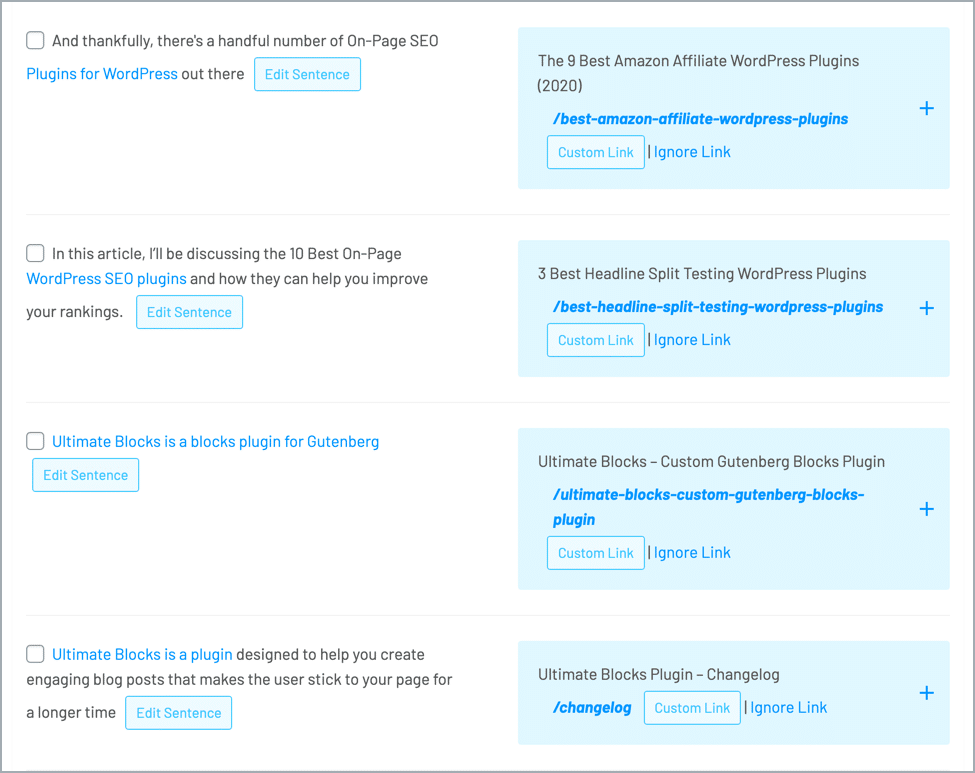
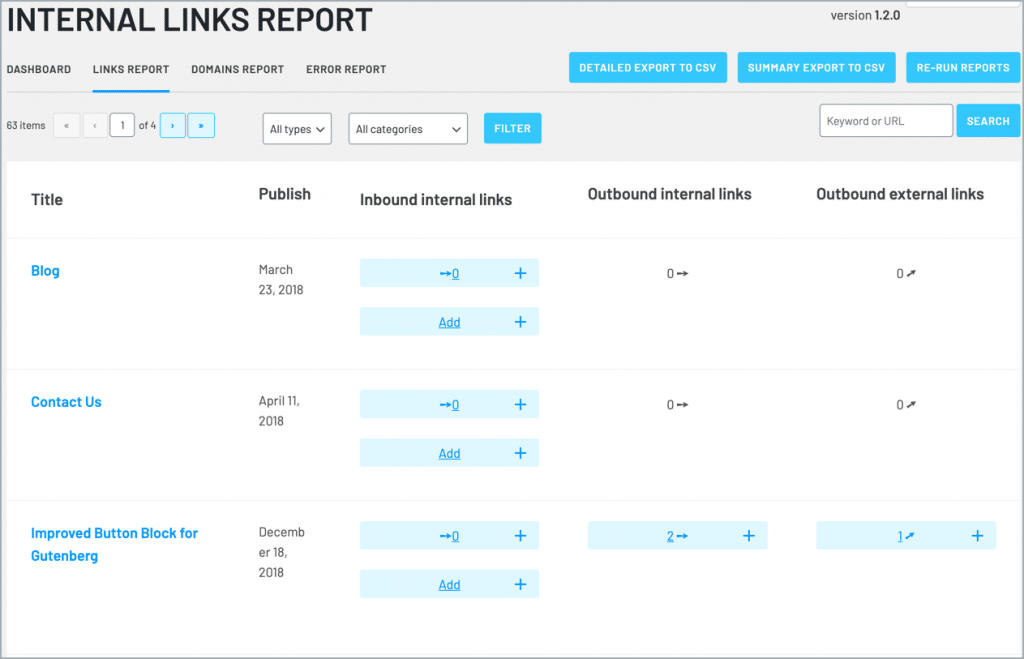
The reporting is arguably more useful than the suggestions. Link Whisper scans your whole site and shows how many internal links point to each page. That is the fastest way to find orphan pages, the posts nothing on your site links to, which are the ones search engines struggle to find and value.
Other features worth knowing about: auto linking rules (pick a keyword, pick a destination, and every past and future mention links automatically), broken link checking, a URL changer for updating links site wide, and cross site suggestions if you run several sites in the same niche.
Price: There is a free Link Whisper Lite plugin on WordPress.org with basic suggestions and limited reporting. Paid plans are $97/year for one site, $197/year for three sites, $297/year for ten sites, and $497/year for fifty sites. All plans include the same features and a set of AI credits for the semantic suggestion engine. There is no lifetime license and no monthly billing.
Worth knowing: Any links you have already created stay on your site if you cancel. You just stop getting new suggestions.
Read our in depth Link Whisper review and see more internal linking plugins.
6. Smush
Free • 1 million+ active installs • 4.8 stars
Images are usually the heaviest thing on a page, which makes image optimization the cheapest speed win available to most sites.
Smush compresses images automatically as you upload them, and can bulk compress everything already in your media library. It also handles lazy loading, so images below the fold only load when a visitor scrolls to them.
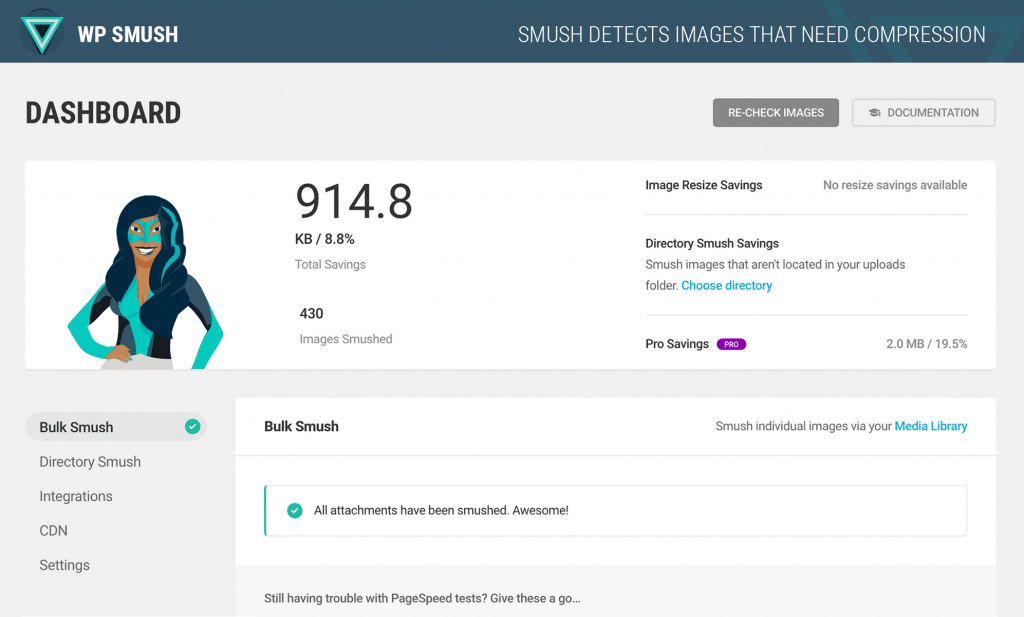
Our favourite feature is the incorrect size detection, which flags images being displayed much smaller than they actually are. Those are pure wasted bytes.
Price: Free. The free version uses lossless compression, which protects image quality but produces smaller savings, and it caps individual files at 5MB and processes bulk jobs in batches of 50. There is no monthly or yearly limit on how many images you can optimize. Smush Pro adds stronger compression and an image CDN, and comes as part of a WPMU DEV membership rather than a standalone purchase.
Alternative worth considering: If the 5MB cap or the lossless only limitation is a problem, ShortPixel and Imagify both offer more aggressive compression on their free tiers.
See more options: Best WordPress image optimization plugins
7. Redirection
Free • 2 million+ active installs
Every time you change a URL, delete a post, or restructure your site, you create a dead link. Redirection is the standard free tool for cleaning that up.
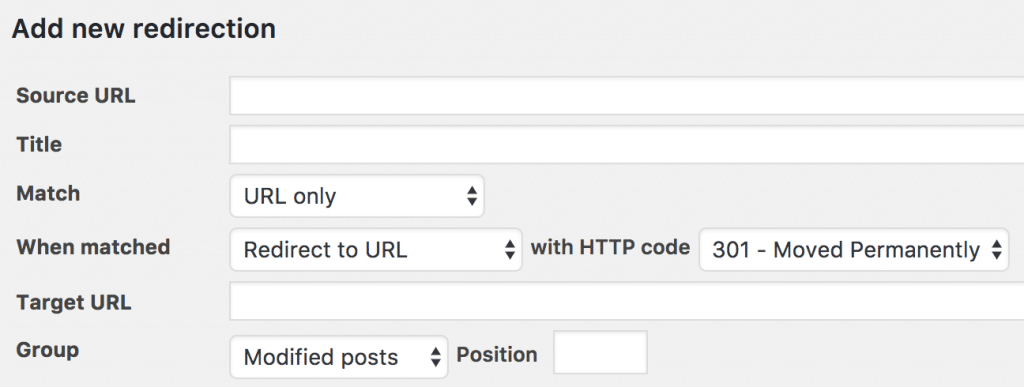
It lets you create and manage 301 redirects without touching server files, and it can create them automatically whenever a post’s URL changes, which quietly saves you from your own mistakes.
It also logs every 404 error on your site, so you can see exactly which broken URLs people and search engines are hitting, then redirect them somewhere useful.
Other features:
- Conditional redirects based on browser, referrer, cookies, and more
- Full logging of redirects and 404s
- Custom HTTP headers
- Query parameter handling
- Import and export, including full settings
Price: Completely free, with no premium version. It has been actively maintained by John Godley for over ten years and is still getting regular updates.
One caution: Turn off logging once you have cleaned things up, or on a busy site the log tables can grow large.
Guide: How to redirect URLs in WordPress
8. Broken Link Checker
Free • 500,000+ active installs
Broken links are bad for readers and they waste the crawl effort search engines spend on your site. On a site more than a couple of years old, you almost certainly have some.
Broken Link Checker scans your posts, pages, comments, and custom fields for links that no longer work, plus missing images and broken embeds. It lists everything in one dashboard so you can fix or unlink in bulk, without opening each post.
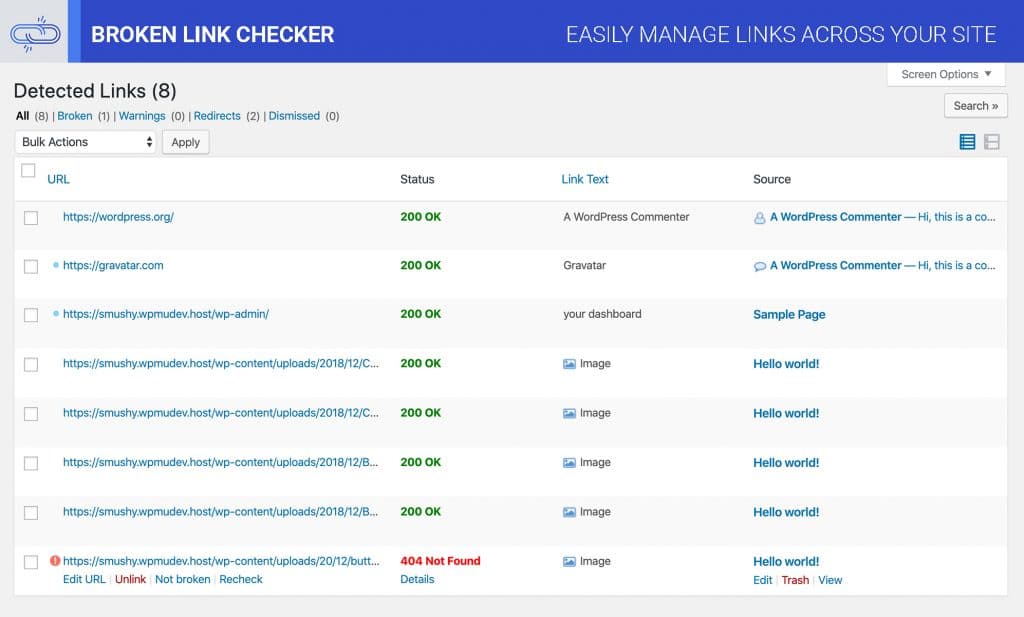
Important change since this post was first written: the plugin now has two engines. The local engine runs scans on your own server, which is the classic behaviour and the reason some hosts used to complain about it on large sites. The cloud engine runs the scan on WPMU DEV’s servers instead, which is faster and puts no load on your site. The cloud engine needs a free WPMU DEV account, but you do not need a paid membership. You can switch between the two inside the plugin.
Price: Free, both engines.
Alternative: If you already use Link Whisper, its broken link checker covers a lot of the same ground and you may not need a second plugin.
9. Schema Pro
$79/year or $249 once
Rank Math and Yoast both add schema markup, and for most blogs that is enough. Schema Pro is for when it is not.
The difference is the mapping system. Instead of setting schema post by post, you pick a schema type, pick which posts, pages, categories, or custom post types it should apply to, map your fields once, and it applies everywhere automatically. On a large site that is the difference between an afternoon and a month.
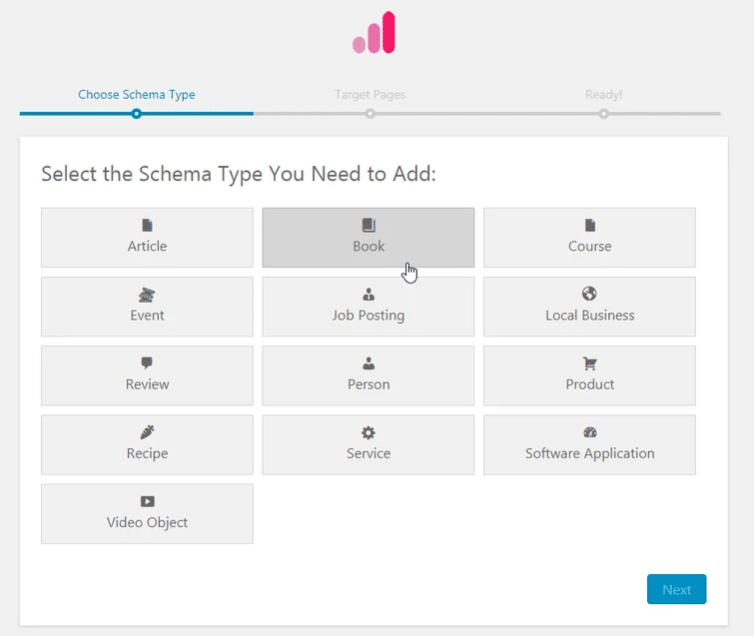
It supports over 20 schema types, including Review, Local Business, Article, Service, Product, Course, Recipe, Person, Job Posting, Software Application, Book, Event, Video Object, Podcast, Vehicle Listing, Dataset, Profile Page, and QA Page. Everything is output as JSON-LD, and it works with ACF custom fields.
A necessary reality check on schema in 2026. Structured data has never been a ranking factor, and Google has been steadily retiring rich results:
- FAQ rich results were fully deprecated on 7 May 2026. They no longer appear in Google Search for any site. FAQPage markup is still valid and harmless, and other search engines and AI tools still read it, but it will not expand your listing in Google any more.
- HowTo rich results were deprecated back in 2023 and do not appear on any surface.
- Review stars still show for things like products, books, and recipes, but not for a site reviewing itself.
So use schema because it helps machines understand your page, not because you are chasing a specific SERP feature that may not exist next year.
Price: $79/year (often discounted, recently $69) for unlimited websites, or $249 as a one time lifetime purchase (recently $229). There is a 14 day money back guarantee. Note that renewals are at full price.
See more: Best rich snippets WordPress plugins
10. Ultimate Blocks
Free • Our own plugin
Full disclosure: this is our plugin, which is exactly why it is not sitting at the top of this list. Ultimate Blocks is not an SEO plugin. It is a block plugin that makes your content easier to read and more engaging, and better content tends to do better in search.
We are being deliberate about that wording. Google has repeatedly said that time on page and bounce rate are not direct ranking factors. What is true is simpler and less dramatic: pages that readers actually finish and come back to tend to earn links, shares, and repeat visits, and those things do matter.
Here is what is genuinely useful for SEO minded bloggers:
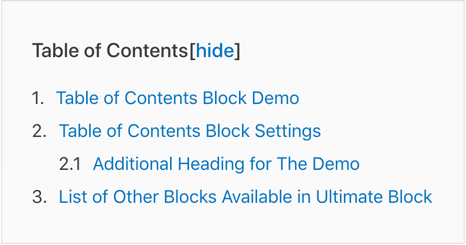
Table of Contents. A table of contents block helps readers jump straight to what they came for on a long post. Google sometimes picks up those anchor links and shows them as jump links in the search result, which can win you extra clicks.
Review block. The Review block adds a schema enabled review box. Where Google still shows review stars, this is how you qualify for them.
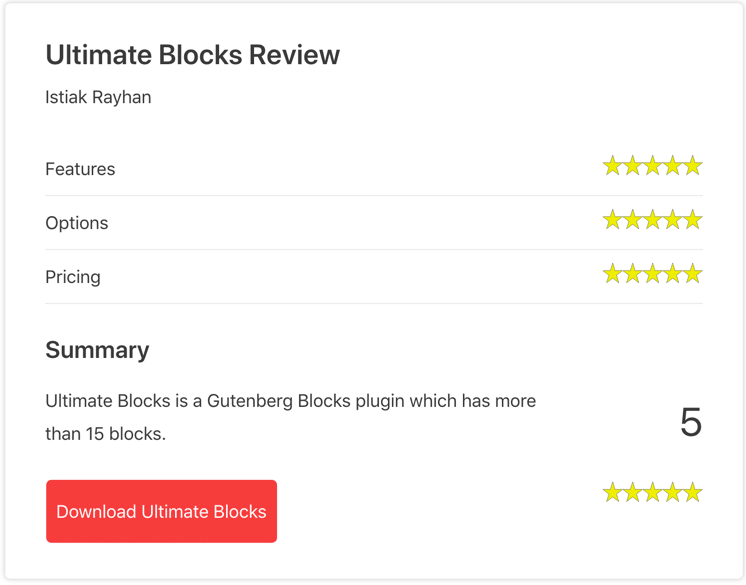
Content Toggle. An accordion block for FAQs and long asides. It supports FAQ schema, though as noted above that no longer produces a rich result in Google. It still keeps long pages readable, which is the better reason to use it.
Content Filter. An interactive filter that lets readers narrow a long list down to what applies to them. Useful on roundups and comparison posts.

There are also blocks for tabbed content, calls to action, styled lists, expandable text, testimonials, click to tweet, social sharing, countdowns, progress bars, post grids, star ratings, image sliders, image hotspots, timelines, counters, and coupons.
Price: Free on WordPress.org, with a paid Pro version.
11. WP Last Modified Info
Free • 40,000+ active installs • 4.9 stars
If you update old posts (and you should), your readers cannot tell unless you show them. A three year old publish date on a freshly rewritten article makes people bounce.
WP Last Modified Info displays a “last updated” date above or below your content, and adds the matching dateModified structured data so search engines know the content changed too.
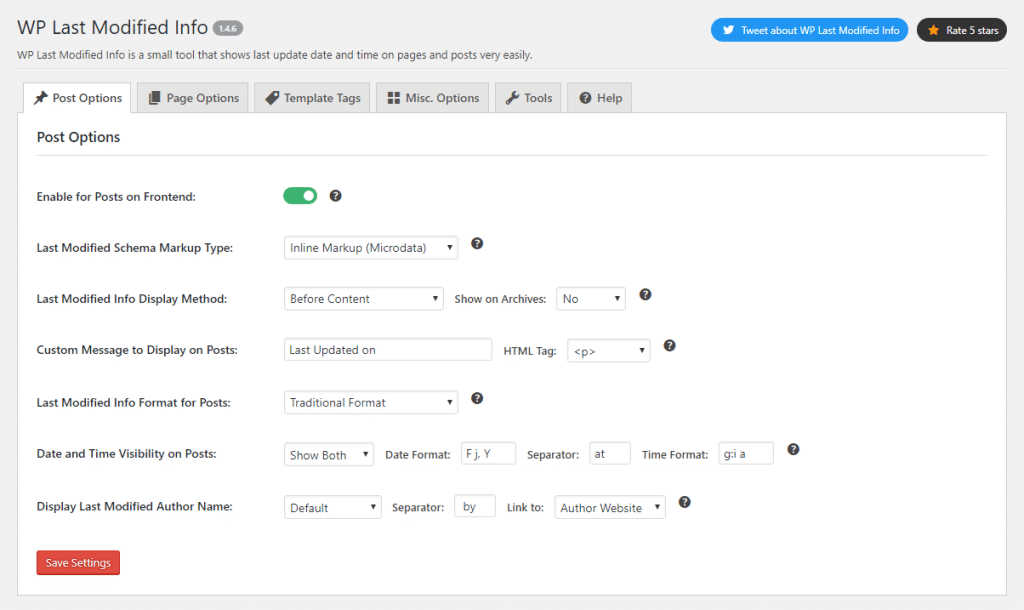
Useful details: you can replace the published date entirely or show both, set a minimum gap so the updated date only appears if the change was meaningful, sort posts by last modified date in the admin, lock the modified date when you are only fixing a typo, and get an email when someone edits a post. It works with Yoast SEO, Rank Math, All in One SEO, SEOPress, and others, and includes blocks for the block editor.
Price: Free.
12. SEMrush SEO Writing Assistant
Free plugin, but you need a Semrush account
This one scores the content itself rather than the settings around it. Set a target keyword and it compares your draft against the pages currently ranking in Google’s top ten, then rates it on readability, tone of voice, originality, and SEO.
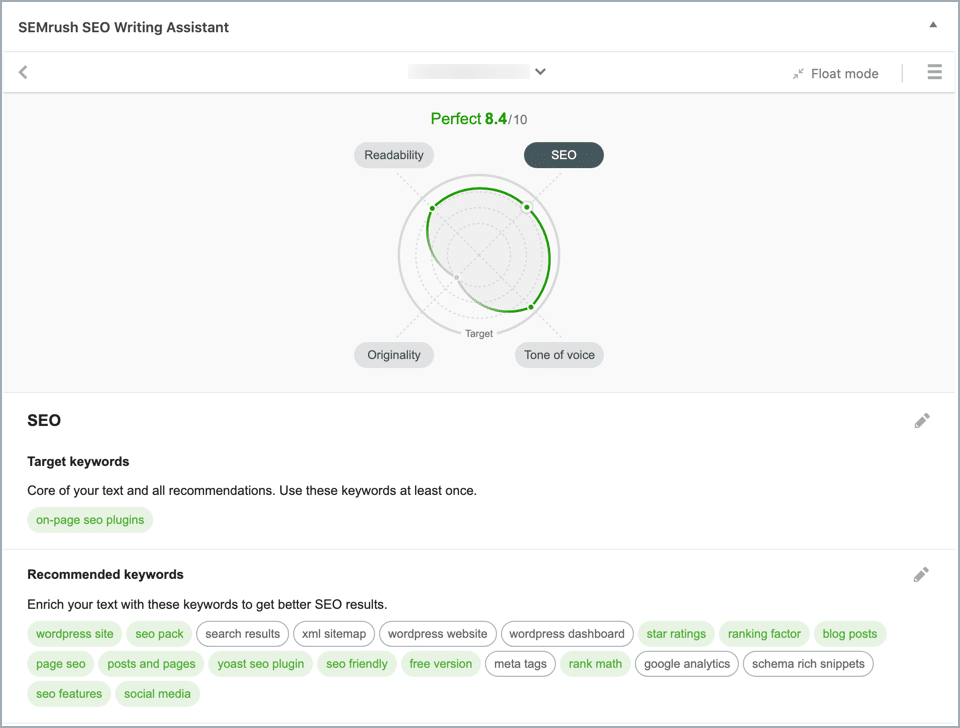
Be clear eyed about the free tier. The plugin is free, but it is a front end for Semrush, and Semrush has tightened the limits significantly. On a free or lower tier account you get a single recommendation set, for life. That is enough to try it once, not enough to use it as part of a workflow. Its rating on WordPress.org sits at 2.8 stars, and most of the low reviews are about exactly this.
Price: The plugin is free. Real use requires a paid Semrush subscription.
Verdict: Excellent if you already pay for Semrush. Skip it if you do not, and use Rank Math’s or Yoast’s built in content analysis instead.
13. Thirsty Affiliates
Free • Pro from $99.60/year
If you run affiliate links, this one earns its place. ThirstyAffiliates turns long, ugly affiliate URLs into clean links on your own domain, like yoursite.com/go/product-name. Cleaner links look more trustworthy, and you can change the destination in one place instead of editing fifty posts when a program changes its URLs.

From an SEO point of view the important part is control. You can set links to be nofollow and open in a new tab by default, which is what Google asks for on affiliate links. The plugin also has smart uncloaking for Amazon Associates, whose terms do not allow cloaked links.
The free version covers link cloaking, categorization, the link picker in the editor, nofollow and new tab options, and basic click statistics. Pro adds automatic keyword linking, advanced reports, geographic redirects, Amazon API importing, CSV import and export, link scheduling, and an automatic 404 checker for your links.
Price: Free on WordPress.org. Pro is currently $99.60/year for one site, $149.60/year for five sites, and $199.60/year for ten sites. Those are introductory prices (list prices are $249, $374, and $499) and renewals are at full price, so factor that in. ThirstyAffiliates is now owned by Caseproof.
Related: Best URL shortener WordPress plugins
14. Social Snap
Free Lite version • Paid Pro
Social Snap adds share buttons, follow buttons, click to tweet boxes, and social meta tags. It is last on this list for an honest reason: its connection to SEO is the weakest here.
You will still see people claim that social signals are a ranking factor. Google has said repeatedly that shares and likes are not used directly in rankings. What social sharing actually does is put your content in front of more people, some of whom link to it, and links do count. That is a real benefit, but it is an indirect one.
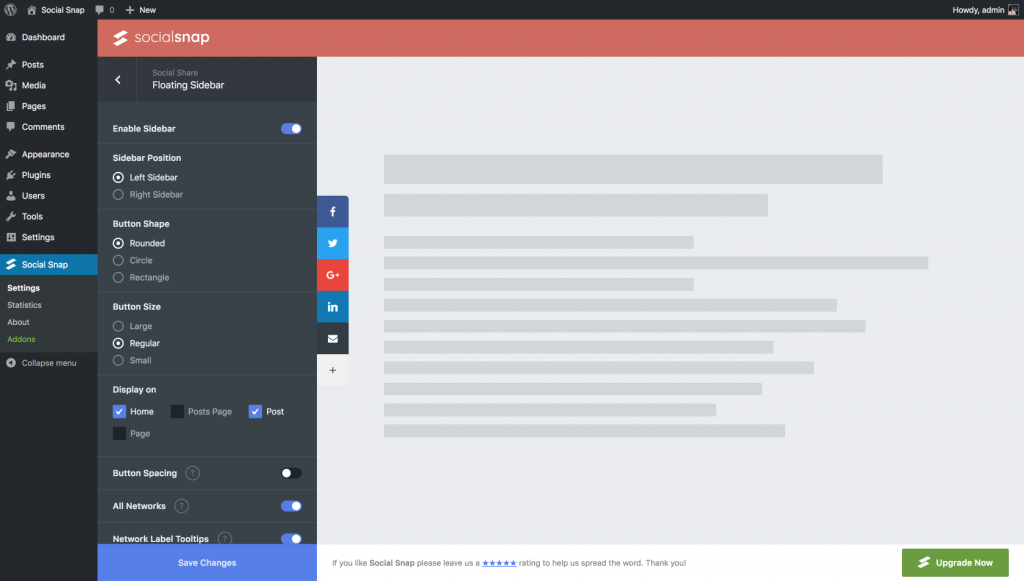
The Lite version gives you share buttons for the main networks, follow buttons, click to tweet boxes, and blocks for the block editor. Pro adds 30+ networks with share counters, more placements, share count recovery, social meta tags, analytics, social login, and an auto poster.
Fair warning: The free plugin sits at 4.2 stars with around 10,000 active installs, and a recurring theme in recent reviews is slow or absent support. Worth knowing before you buy the Pro version.
Price: Free Lite version, paid Pro plans. Check the Social Snap site for current pricing.
See alternatives: Best WordPress social media sharing plugins
What Should You Actually Install?
Fourteen plugins is a list, not a recommendation. Here is the short version.
Everyone should have:
- One all in one SEO plugin. Rank Math or Yoast, not both.
- A speed plugin. WP Rocket, or LiteSpeed Cache if your host supports it.
- Smush or a similar image optimizer.
Add if it applies to you:
- Publishing several times a week, or covering timely topics? Add CrawlWP.
- More than 100 posts? Add Link Whisper.
- Changed your URLs or migrated your site? Add Redirection.
- Site more than two years old with lots of outbound links? Add Broken Link Checker.
- Regularly updating old content? Add WP Last Modified Info.
- Running affiliate links? Add ThirstyAffiliates.
- Need schema across hundreds of pages? Add Schema Pro.
One last thing. Plugins make SEO work faster and less error prone. They do not make you rank. The content, the topic you chose, and the links you earn still do that. Treat these as tools that clear the obstacles out of the way.
Which of these are you using? Let us know in the comments.
Disclosure: This post contains affiliate links. That means if you make a purchase using any of these links, we will earn a commission without any extra cost to you. Thanks for your support.
Found this helpful? See more of us on Google.
Add UltimateBlocks.com as a preferred source and our WordPress guides will show up more often in your Top Stories, AI Overviews and AI Mode.
Free, one tap, remove anytime


Leave a Reply