Skip to content
How to Use the Social Icons Block In WordPress

The Social Icons block in WordPress allows you to add social icons to your WordPress posts/pages and link them to your respective social media profiles. You can connect many other platforms as well with this block alongside social networks. This is a default Gutenberg block, allowing you to showcase 40+ social icons on any part…
How to Add a Table of Contents in WordPress (With/out a Plugin)

Did you ever stop reading a long post because you got bored or couldn’t find the section you wanted to read? Well, this wouldn’t happen if the author had added a table of contents in the post. A table of contents highlights all the valuable headings of a post/page and lets readers jump to their…
How to Add a Border Around an Image in WordPress

Do you want to learn how to add a border around an image in WordPress? Adding borders around your images can be an excellent way to enhance them and make them stand out. WordPress has many ways to add a border around an image. This can be done using third-party plugins, custom CSS, and whatnot. …
How to Change Button Color in WordPress (Easy Ways)

Buttons are essential elements on any website. They are pivotal call-to-action tools, guiding visitors through your site’s journey. It’s hard to imagine a modern website without these crucial interactive elements. But what makes a button not just functional but also visually compelling? The answer often lies in its color. Choosing the right color for your…
10+ Best FAQ Plugins for WordPress (All are FREE)

With hundreds of lines of text on your website, an FAQ section works as a godsend (and a business tool) to help get your message across clearly. It eases the pressure off your Support team and addresses common queries your visitors may have. Customers are usually looking to purchase products that solve a problem for…
How to Use the Separator Block in WordPress (Gutenberg)
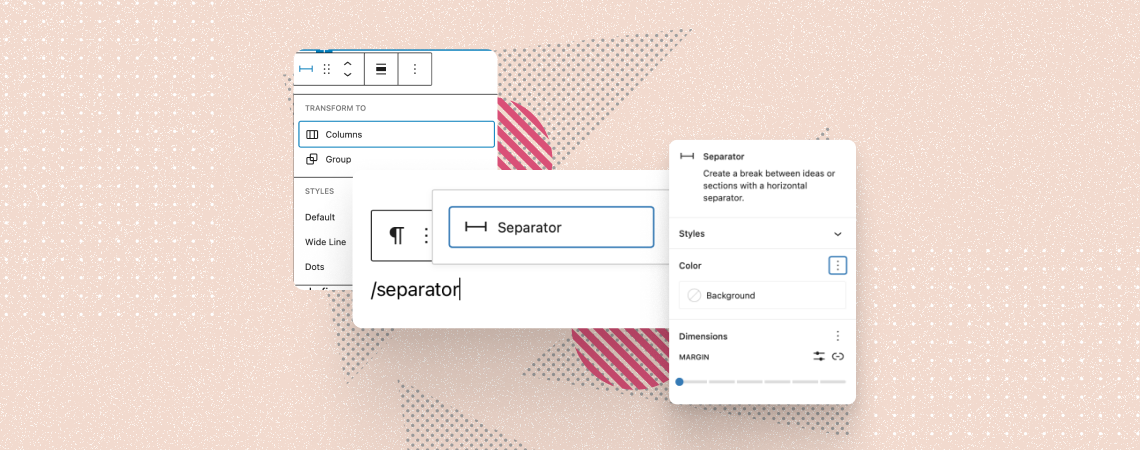
The Separator block is a default Gutenberg block that lets you create a distinguishable visual break between two content blocks. It allows you to add a horizontal line or dots to create a clear separation between different sections on posts/pages. You can use this block to draw attention to specific information, create a transition between…
How to Create a Video Gallery in WordPress (With/out a Plugin)

Videos always catch the eyesight of a visitor. If one visitor finds his preferred video, he will stick to your website. You can embed videos one after one in WordPress. But you cannot simply add a video gallery to your website. In this post, I will show you how to create a video gallery in…
How to Add Text Over an Image in WordPress (Step by Step)

Using text over images is a great way to present content or deliver a message. It not only looks attractive but also helps convert your visitors into subscribers or customers. In this article, I’ll show you how to add text over images in WordPress in a simple step-by-step tutorial. While there are many methods to…
How to Create a Comparison Table in WordPress (With/out a Plugin)

A comparison table always gives valuable information in an organized way. But to show the one, you have to create a comparison table first. If you don’t know how to create a comparison table, then this post is for you. In this post, I will show you the process to add a comparison table to…
Search
Recent Posts
- 10+ Best WordPress Knowledge Base & Documentation Plugins
- 10 Best Thrive Leads Alternatives for 2026 (Free and Paid)
- 8 Best WordPress Hosting With Free Domain Name (2026)
- 14 Best SEO Plugins for WordPress (Most Are Free)
- 6 Best Image Hotspot WordPress Plugins (Free & Paid)
Categories
- Affiliate Marketing (5)
- Alternatives (2)
- Blogging (20)
- Books (8)
- Comparison (1)
- Courses (1)
- Deals (41)
- Giveaway (1)
- Gutenberg (47)
- How To (417)
- Marketing (2)
- Payment (1)
- Productivity (2)
- Release Notes (2)
- Review (7)
- SEO (5)
- Services (1)
- Sites (1)
- Themes (69)
- Tools (8)
- Web Hosting (13)
- WooCommerce (6)
- WordCamp (1)
- WordPress Block Editor Tutorials (101)
- WordPress Fixes (4)
- WordPress Hosting (19)
- WordPress Plugins (119)